Questionnaire
A guided form, one question at a time — branching, skips, validation and progress.
Installation
Questionnaire ships with the library — install it once, then import:
import { Questionnaire } from "@delacour/react-native-ui/questionnaire";Or copy the source into your project, to own and edit it:
bunx delacour@latest add questionnaireThe questionnaire is built from the library's own controls, so installing it also brings in
radio, checkbox, rating, input, textarea, toggle-button, steps, progress, button,
field, text, surface and separator.
Usage
Pass the questions and receive the answers. With no children the questionnaire draws a progress bar, the question and a footer.
import { type Question, Questionnaire } from "@/components/ui/questionnaire";
import { View } from "react-native";

const QUESTIONS: readonly Question[] = [
  {
    id: "role",
    kind: "single",
    isRequired: true,
    title: "What best describes your role?",
    options: [
      { value: "design", label: "Designer" },
      { value: "engineering", label: "Engineer" },
      { value: "other", label: "Something else", isOther: true },
    ],
  },
  { id: "satisfaction", kind: "rating", isRequired: true, title: "How happy are you with the library?" },
];

export default function Example() {
  return (
    <View className="flex-1 justify-center p-4">
      <Questionnaire questions={QUESTIONS} onSubmit={(answers) => console.log(answers)} />
    </View>
  );
}
Composing the parts
Add a title, choose a progress style, or rearrange the footer. Each footer button hides itself where it does not apply: Back on the first question, Skip on a required one, Next on the last, Submit everywhere else.
<Questionnaire questions={QUESTIONS} onSubmit={send}>
  <Questionnaire.Title>Quick feedback</Questionnaire.Title>
  <Questionnaire.Progress variant="count" />
  <Questionnaire.Question />
  <Questionnaire.Footer>
    <Questionnaire.Back />
    <Questionnaire.Spacer />
    <Questionnaire.Skip />
    <Questionnaire.Next />
    <Questionnaire.Submit>Send</Questionnaire.Submit>
  </Questionnaire.Footer>
</Questionnaire>
Question kinds
kind picks both the control and the answer's shape.
| Kind | Control | Answer |
|---|---|---|
single | A radio group | { kind: "single", value, other? } |
multiple | A checkbox group, with minSelected / maxSelected | { kind: "multiple", values, other? } |
text | An Input, or a growing Textarea with isMultiline | { kind: "text", value } |
rating | Stars — maxValue (default 5), step 1 or 0.5 | { kind: "rating", value } |
scale | Numbered toggles from min to max, with end captions | { kind: "scale", value } |
yesNo | Two wide toggles, relabelled with yesLabel / noLabel | { kind: "yesNo", value: "yes" | "no" } |
An option with isOther reveals a text field when chosen, and the answer is incomplete until it is
filled in.
Required, optional and skipped
A required question blocks Next until it is answered. An optional one shows Skip, which records a
deliberate { kind: "skipped" } — distinct from never answering — and keeps it in the submission.
Empty text, no boxes ticked and a zero rating all count as no answer.
Conditional questions
showIf shows a question only while its rule holds against earlier answers.
{
  id: "which",
  kind: "multiple",
  title: "Which ones?",
  showIf: { type: "equals", questionId: "pets", value: "yes" },
  options: [/* … */],
}
Rules are answered, equals, includes (for multiple), gte and lte (for rating and
scale), and and / or / not over others. A hidden question is not counted, shown or
submitted, and its stale answer is dropped. Back returns to the question you actually saw, across a
branch. A rule may only name a question declared before it.
Validation and messages
Next is dimmed but never disabled while the answer would not pass: a press shows the error under the control, reads it aloud and buzzes once. Submit checks every visible question and moves to the first that fails.
getErrorMessage words each error — the hook for your own copy or another language.
<Questionnaire
  questions={QUESTIONS}
  getErrorMessage={(error) => (error.type === "required" ? "We need an answer to carry on." : "Check this answer.")}
/>
Submitting
onSubmit receives the visible questions' answers. Return a promise and the form shows a spinner
and stays inert until it settles; a rejection re-opens the form and is not swallowed.
<Questionnaire questions={QUESTIONS} onSubmit={async (answers) => { await api.save(answers); router.back(); }} />Controlled
Hold answers and currentId yourself to persist progress or jump around. isLinear={false} lets
currentId and goTo reach any visible question.
const [answers, setAnswers] = useState<Answers>({});
const [currentId, setCurrentId] = useState<string | null>(null);

<Questionnaire
  questions={QUESTIONS}
  answers={answers}
  onAnswersChange={setAnswers}
  currentId={currentId}
  onCurrentChange={setCurrentId}
/>;
Progress
Questionnaire.Progress draws a bar, a steps stepper or a plain count. All three count only
the visible questions — so the total can change as branching shows and hides questions — and all
three read "Question 2 of 5" to a screen reader.
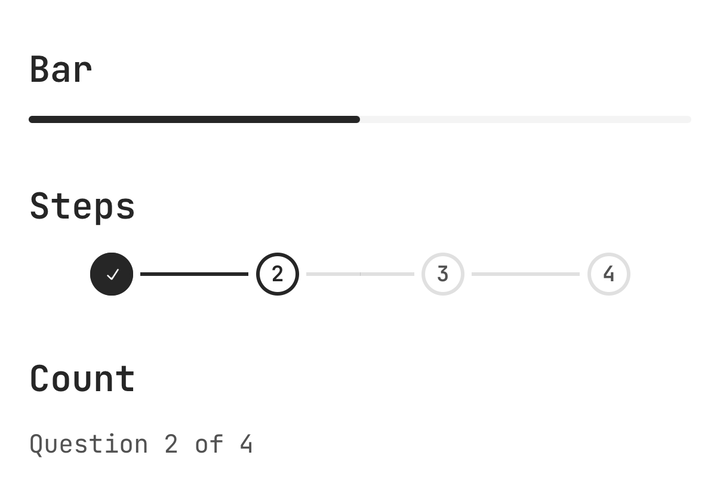
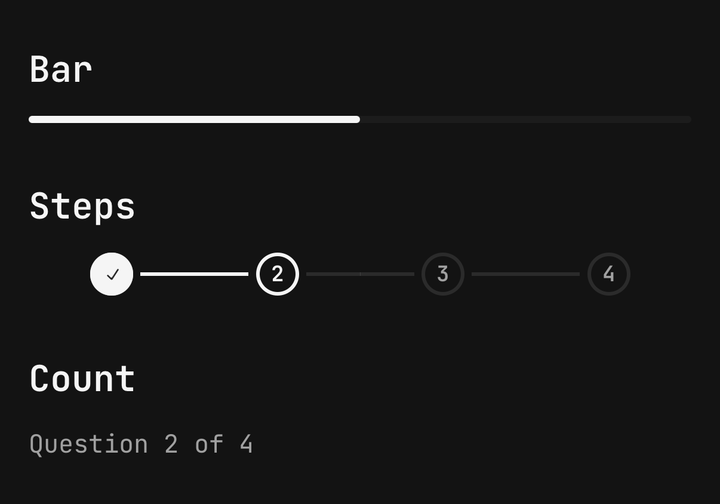
<Questionnaire.Progress variant="bar" />
<Questionnaire.Progress variant="steps" />
<Questionnaire.Progress variant="count" />
Framed and unframed
Framed (the default) is a card with a header strip and a footer band. isFramed={false} is a bare
column for a screen or a sheet that already has its own gutter.
<BottomSheet.Content>
  <BottomSheet.Title>Before you go</BottomSheet.Title>
  <Questionnaire isFramed={false} questions={QUESTIONS} onSubmit={() => setOpen(false)} />
</BottomSheet.Content>
Accessibility
- After every move the question is announced with its position and title — "Question 2 of 5: Your role" — and focus moves to its heading.
- A blocked Next announces its error; the dimmed button stays focusable with the hint "Answer required".
- Scale buttons read as "7 out of 10"; Skip reads "Skip this question".
- The question transition becomes a short fade under Reduce Motion.
API Reference
Anatomy
| Part | What it is |
|---|---|
Questionnaire | Owns the flow — answers, the current question, validation, history |
Questionnaire.Title | The questionnaire's name, as a heading |
Questionnaire.Progress | bar, steps or count |
Questionnaire.Question | The current question's heading, description, control and error |
Questionnaire.Footer | The button row; lays out the defaults when childless |
Questionnaire.Back / .Next / .Skip / .Submit | Footer buttons — Button props, self-hiding |
Questionnaire.Spacer | Fills the footer row |
Questionnaire
Prop
Type
Questionnaire.Progress
Prop
Type
Questionnaire.Question
Prop
Type
Reading the flow
useQuestionnaire() returns the current question, answers, errors, progress, and the next, back,
skip, submit, goTo, setAnswer and reset actions — for a custom footer or a review list.
Pure helpers
The rules are exported without React, so a server can re-check a submission against the ones the device applied.
import { getVisibleQuestions, validateAnswer } from "@delacour/react-native-ui/questionnaire";

const errors = getVisibleQuestions(questions, answers)
  .map((question) => validateAnswer(question, answers[question.id]))
  .filter(Boolean);