Flow
A pan-and-zoom canvas of nodes joined by edges that route themselves, for pipelines and builders.
Installation
Flow ships with the library — install it once, then import:
import { Flow } from "@delacour/react-native-ui/flow";Or copy the source into your project, to own and edit it:
bunx delacour@latest add flowUsage
import { Card } from "@/components/ui/card";
import { Flow, type FlowPoint } from "@/components/ui/flow";
import { useState } from "react";

export default function Example() {
  const [positions, setPositions] = useState<Record<string, FlowPoint>>({
    source: { x: 0, y: 40 },
    sink: { x: 240, y: 0 },
  });

  return (
    <Flow
      className="h-96"
      fitViewOnMount
      onNodeDragEnd={(id, position) => setPositions((current) => ({ ...current, [id]: position }))}
    >
      <Flow.Background />
      <Flow.Node id="source" position={positions.source}>
        <Card size="sm">
          <Card.Header>
            <Card.Title>Source</Card.Title>
          </Card.Header>
        </Card>
        <Flow.Handle id="out" side="right" />
      </Flow.Node>
      <Flow.Node id="sink" position={positions.sink}>
        <Card size="sm">
          <Card.Header>
            <Card.Title>Sink</Card.Title>
          </Card.Header>
        </Card>
        <Flow.Handle id="in" side="left" type="target" />
      </Flow.Node>
      <Flow.Edge from="source.out" to="sink.in" variant="smoothstep" hasArrow />
      <Flow.Controls />
    </Flow>
  );
}
Anatomy
<Flow>
  <Flow.Background />
  <Flow.Group>
    <Flow.Node>
      <Flow.Handle />
    </Flow.Node>
  </Flow.Group>
  <Flow.Edge />
  <Flow.Controls />
  <Flow.MiniMap />
</Flow>
Children draw in three layers whatever order they are written in: the background and every edge in one
Skia canvas beneath the nodes, nodes and groups in the layer that pans and zooms, and the controls and minimap on
top, unscaled. Edges and the background have to be direct children of Flow — a .map() or a fragment
there is fine — so the canvas can find them.
The canvas takes its size from its className — give it a height (h-96), or flex-1 inside a parent
that has one.
The app owns the graph
Positions are props, and the canvas never changes them. A drag moves the node on the UI thread while the
finger is down, then reports once through onNodeDragEnd; a dragged connection reports through
onConnect. Store the result and pass it back, and the node lands exactly where the drag left it.
<Flow
  onNodeDragEnd={(id, position) => moveNode(id, position)}
  onConnect={(connection) => addEdge(connection)}
>
  …
</Flow>
Nodes and handles
A node is any view — usually a Card — positioned by its top-left corner in graph units, which are layout
points at zoom 1. It is measured once, and a tap fires onPress only when the finger did not travel.
A handle sits on a side of its node, offset of the way along it, and is where edges attach and
connections are dragged from. type says whether a connection may leave it (source), arrive at it
(target), or either (both).
<Flow.Node id="merge" position={{ x: 320, y: 80 }} isSelected={selected === "merge"} onPress={select}>
  <Card size="sm">…</Card>
  <Flow.Handle id="a" side="left" type="target" offset={0.3} />
  <Flow.Handle id="b" side="left" type="target" offset={0.7} />
  <Flow.Handle id="out" side="right" />
</Flow.Node>
Edges
An edge names its ends as "nodeId" or "nodeId.handleId" and routes itself from where those nodes are
now — on the same frame as a drag, not a render behind. With no handle and no fromSide / toSide, it
leaves the side facing the other node.
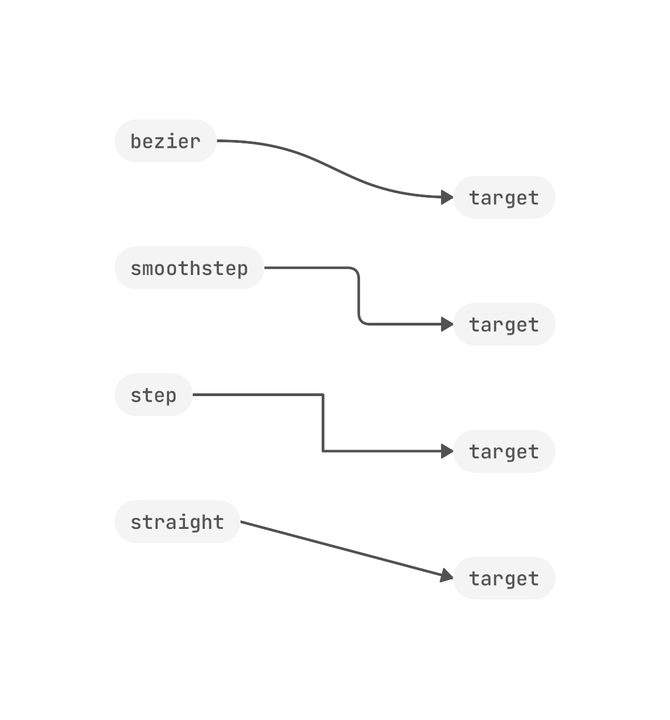
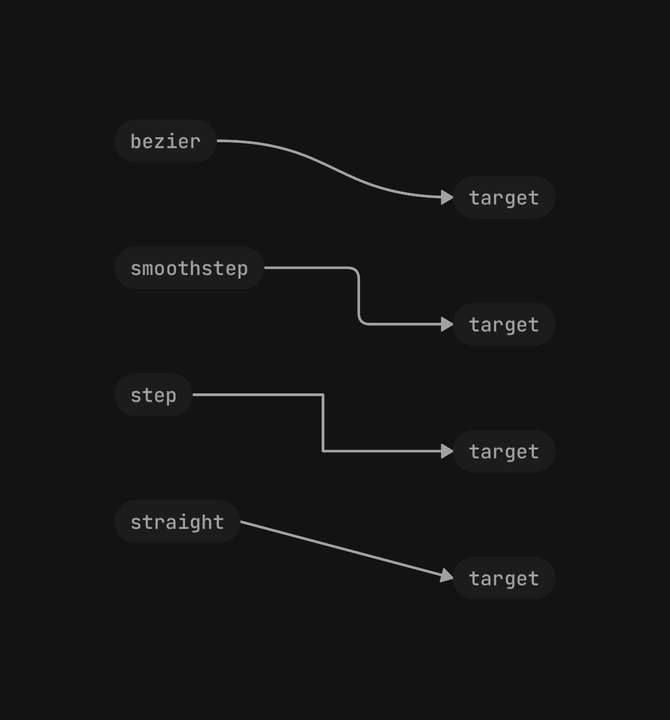
<Flow.Edge from="a" to="b" />
<Flow.Edge from="a.out" to="b.in" variant="smoothstep" radius={12} />
<Flow.Edge from="a" to="c" variant="step" gap={24} />
<Flow.Edge from="a" to="d" variant="straight" isDashed hasArrow color="destructive" />
<Flow.Edge from="queue" to="worker" isAnimated />
bezier bows out of each side, smoothstep turns with rounded corners, step turns square, and
straight is a line. isAnimated marches the dashes toward the target, and holds still under reduce
motion.
Groups
A group is a labelled box its nodes move with. It is not a coordinate space: a grouped node's position is
a graph coordinate like any other. Dragging the box carries every node in it and fires onNodeDragEnd
for the group and for each node.
<Flow.Group id="ingest" label="Ingest" position={{ x: 0, y: 0 }} size={{ width: 420, height: 220 }}>
  <Flow.Node id="fetch" position={{ x: 24, y: 48 }} isConfined>…</Flow.Node>
  <Flow.Node id="parse" position={{ x: 220, y: 48 }} isPinned>…</Flow.Node>
</Flow.Group>
isConfined keeps a node inside its group while dragged. isPinned stops its own drag but it still
rides the group; isDraggable={false} keeps it where it is, group or no group.
Connections
Drag from one handle to another and the canvas asks before it connects: the handle types first — a drag
may start at either end, and a node never connects to itself — then isValidConnection. Only a
connection both accept reaches onConnect, and the app adds the edge.
<Flow
  isValidConnection={(connection) => !hasEdge(connection)}
  onConnect={(connection) => setEdges((current) => [...current, connection])}
>
  …
</Flow>
Viewport, controls and minimap
One- and two-finger pan, and pinch about the fingers, between minZoom and maxZoom. fitViewOnMount
frames every node once they have measured, and never magnifies past one to one.
Flow.Controls adds zoom, fit and lock buttons; lock stops pan, zoom, every drag and every connection.
Flow.MiniMap draws every node in a corner and frames the part on screen. For controls of your own,
useFlow() returns the same actions from anywhere inside the canvas.
function FrameButton() {
  const { fitView } = useFlow();
  return <Button onPress={fitView}>Frame</Button>;
}
Accessibility
Each node is one element, named by accessibilityLabel (its id otherwise), with actions for everything a
finger can do: select (with onPress), move up, down, left and right by accessibilityMoveStep (when it
can be dragged), one "Connect" for each target isValidConnection accepts, and delete (with onDelete).
Each reports through the same callback as the gesture. Handles, edges, the background and the minimap are
hidden; the controls are labelled buttons.
Performance
A drag, a pan and a pinch render nothing — every position is a shared value on the UI thread, and edges reroute there. React re-renders only when a node or group mounts, unmounts or changes its handles. Keep node content light, and check large graphs on a device.
API Reference
Flow
Prop
Type
Flow.Background
Prop
Type
Flow.Node
Prop
Type
Flow.Handle
Prop
Type
Flow.Edge
Prop
Type
Flow.Group
Prop
Type
Flow.Controls
Prop
Type
Flow.MiniMap
Prop
Type
useFlow
Returns { viewport, fitView, zoomBy, isLocked, setLocked, getNodeRect } from anywhere inside a Flow.